Showing posts with label UX. Show all posts

Friday, April 12, 2013

The Truth about PMRobot


I was just in San Francisco on a business development and learning mission for PMRobot. It’s amazing how deeply integrated the culture of entrepreneurship is there. People ask a lot of good but tough questions. Of course, answering tough questions is the best way to get better at explaining our company, and how we can help software and design consulting companies to manage their projects better.

This has me thinking about the general business culture of exaggerating their strengths and covering up their blemishes.

Marketers Lie

You may not even think about it, but you've probably learned to approach most marketing with skepticism.

I’ve always been a terrible liar, of course it’s not something I’ve ever aspired to be. It feels though, that in business, and marketing especially, it's standard operating procedure to exaggerate in order to look bigger than you are. I recently watched an excellent talk by Jason Cohen from the Business of Software conference in 2011. He talks about the importance and value of being honest about your product's strengths and weaknesses. I’m putting this into practice by being brutally honest about our product in conversation with people I meet.   I want to take it a step further by putting it online.

The Benefits of Honesty

People are accustomed to falsehoods and half truths in marketing materials. 

They've developed an automatic filter:

Say you’re the market leader in something? “Yeah, right!”
Fill your site with nothing but unabashedly positive testimonials? “As if!”
Act like you’re a huge company (when you’re not)... people will see through your act.

I could make a high-minded, moralistic argument for honesty in this article, but I believe there’s also a sound business case for honesty.

My experience is that people find honesty refreshing, even disarming. By being upfront about your shortcomings, you give them a reason to trust your claims about your strengths. 

Honesty, also makes you more human and relatable. It makes you the kind of people others want to see succeed. It opens you up for receiving honest feedback, which is essentially to any lean startup.

So let’s be honest about PMRobot. I'll tell you who we are and our story.  By laying it all out on the table, you’ll know what you can expect if you choose to do business with us as a customer.

How was PMRobot Started?

PMRobot was started by Jason Hanley. He’s been running Syllogistic Software for a decade, and during that time, he’s managed his business from several distant corners of the globe. For the past 5 years, he’s been building a tool to help him manage his projects, employees and clients. This tool eventually became PMRobot, a tool to help consultants manage all the aspects of their projects.

Who is PMRobot?

The PMRobot team is still quite small, the development efforts on PMRobot are provided by Jason and his team of programmers at Syllogistic Software. I handle the marketing, blogging and engage with users to find out how we can make the product better for them. We’ve recently brought on Michele Macklin to help us improve our interface and user experience design.

We're passionate about agile and lean project management and productivity.  We believe we can help digital consultants adopt agile project management more effectively.

I’m thankful to be working with such talented individuals on a product that I believe in.

OK, What is PMRobot?

PMRobot is project management for software consultants. It was built by software consultants, and it works best for them and similar companies like internet marketers, app development consultants and digital product companies.

The product is very feature rich. In fact, PMRobot has so many features that it can be overwhelming to new users. However if they take the time to learn how to use the product, they’ll often find that it meets their needs really well.

Our product solves some problems better than others. One of its strengths is bringing together multiple tools into one system, such as workflow management, time tracking and client communication.

Some areas that we see opportunities to address real needs for our customers are in helping with human resource allocation across different projects and understanding the costs and profitability of different projects. Feedback from our users is hugely valuable to us, and it’s what informs our decisions about design and new features.

Why would you want to use a new and unknown app in your business?

Maybe you shouldn’t, it depends what you’re looking for.

We might be a good fit for you if you’re a software consultancy or digital agency, looking for something built to address the particular challenges of including clients in running your projects. You’d be an early adopter and you’ll get to experience working with a product that is evolving, both aesthetically and functionally. T

The benefit of this is that you’d be part of a community of companies using PMRobot and helping us to build a tool for a very specific group. If there’s something specific you’re looking for in a software tool, talk to us, and we’ll consider building it for you.

If you just want something really simple to use out of the box, and are OK with it not being so feature rich, we’re probably not the right product for you.

If you want to be a small customer for a big company, with dedicated 24/7 customer support, PMRobot isn’t the right product for you. But if you want to have a real relationship, and the ability to speak directly with the people building your project management tool, then you’ll appreciate working with us.

If you’re worried that we’re a new startup, and might not be around a year from now, don’t. Syllogistic Software has been around for 10+ years, we’re in this for the long haul.

Still not sure if PMRobot is right for you? Leave a comment and I’ll be in touch with you to discuss, or try us out. -

Monday, March 4, 2013

Friendly new conversation view in PMRobot


PMRobot is just a tool which helps you get your work done. It shouldn't get in the way, and it shouldn't add a layer of separation between you and your collaborators. We've made a simple, but we think significant improvement to the conversations interface to emphasize the human element of your interactions.  

Bigger faces and a clearer indication of who said what should make for a smoother reader experience.

Take a look:

Old and Busted Conversation View


New Hotness Conversation View

If you're new to PMRobot, and looking for a solution to help your team collaborate, try it out. One project is free forever.
-

Friday, February 8, 2013

Too much going on? No problem, you can sort it out.

Now it's easier to get your priorities in order
We're always working to make what's already a great project management app even better and more user friendly.

Now you can spend less time managing and more time getting things done.


Drag and drop your tickets anywhere in the queue


You no longer have to click arrows to move the ticket from one column to the next. The updated sorting saves time, and makes it much easier to get everything laid out in just the right way.  If you haven't seen it, take a look: https://pmrobot.com/tickets/sort


About PM Robot

PMRobot keeps everything in one place, making your job easier.

No more information scattered across 7 different tools.
With PMRobot, there's only one tool to learn, and one place to search for all your files, tasks, and project information.

Questions or ideas? Contact us at http://feedback.pmrobot.com/


-

Sunday, December 9, 2012

New Inline Quickedit feature

Here at PMRobot, we're always looking for ways to reduce the number of clicks.

We call our latest improvement the "Inline Quickedit".

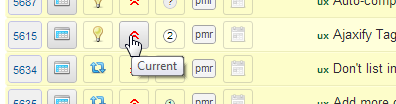
To use the Inline Quickedit feature, simply click or tap a field in the List view:


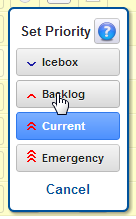
You’ll be presented with a touch-friendly pop-up to quickly select the field:


Two clicks and you’re done!

This feature currently works with:
  • Ticket Type
  • Priority
  • Effort
  • Milestone
  • Assignee

Monday, November 5, 2012

Even easier...

After carefully listening to our users' feedback, we've launched an update of PMRobot that's even easier to use.

So what's new?

1. Project selector with search

Now you can find your projects quickly with typeahead search:


It's placed prominently at the top left in a large font, for easy access.

2. All your settings in one place

You said: "I can't find my settings!"

We listened :-)

No more hunting around. They're all organized in one place now. Just click More... Settings.


3. Hide unwanted features:

You said: "My screen is cluttered with things I don't use!"

We listened.

Too much clutter? Clean it up by turning off the features you don't use!


Organization primaries can change this at https://pmrobot.com/organization/info

4. Feedback and Knowledge Base

Have some more ideas for us? Not sure how to do something?

Check out our need feedback and knowledge base at:
http://feedback.pmrobot.com

Monday, July 23, 2012

New: Clean and simple navigation


PMRobot has a great new menu and navigation system!

We've always had the most features, but sometimes it's been a bit difficult to actually find them. :)

Those days are over.

Everything is now right at your fingertips.

We've crunched through over a year of logs and statistics to determine the most frequently used pages, and put them right up front.

The less popular (but equally useful) pages have been moved to a secondary menu.

They're still easy to access, but don't get in the way of your day-to-day work.

We've also improved the "quick submit" box by moving it to the left and sprucing it up:


...and don't forget -- PMRobot works great on mobile devices like smartphones and tablets!

We hope these improvements help save you even more time, and make your day just a bit more pleasant :)

We're continuing to work hard every day to make PMRobot faster and easier for you.

What do you think of the new navigation?

Monday, July 2, 2012

Drag and Drop Sorting + Gantt Charts

This week we introduced two great new features!

Now you can spend less time managing and more time getting things done.

Drag and Drop Sorting


Instead of dealing with the abstract notions of high, normal, and low, we now use the Agile concepts of Current, Backlog, and Icebox to give an indication of the order in which groups of tickets will be worked on.

Within these main priority levels, you can simply drag tickets up and down to fine-tune the exact ordering of individual tickets.

Try it now at: https://pmrobot.com/tickets/sort

Gantt Chart


This week we also introduced a new beta feature: the Gantt Chart.

A Gantt Chart gives you a quick, visible overview of upcoming milestones and resource allocations.

You can also see at a glance which tickets have not yet been assigned.

Give it a try right now at: https://pmrobot.com/chart/gantt

Don't forget...


PMRobot keeps everything in one place, making your job easier.

No more information scattered across 7 different tools.

With PMRobot, there's only one tool to learn, and one place to search for all your files, tasks, and project information.

Questions or ideas? Contact us at https://pmrobot.com/help


About the author: Jason Hanley slaves tirelessly, spending his days and nights devising new ways to make software project management faster and easier. While PMRobot is managing his projects, he enjoys riding camels in the Sahara desert, teaching English in Spain, and exploring the south of France.

Thursday, April 26, 2012

PMRobot Mobile: Always on the move

Let's face it -- People are always on the move.

You're not always in front of your desktop or laptop.

Suppose you're on the train, heading to work, and want to check in on your notifications and answer a few questions.

Now it's easy!

Just open your mobile web browser and sign in at same place as always -- https://pmrobot.com/home

PMRobot will automatically adjust to your screen size and present you with an optimized mobile experience.

This works on just about any device with a modern browser that supports CSS media queries.

Here are some examples on iOS (iPhone/Apple):


...and a few screenshots running on Android (Samsung/HTC/Google/etc.):


It works best on modern browsers like the ones in iOS and Android, but we'd love to hear how it looks on your device.

Happy trails!